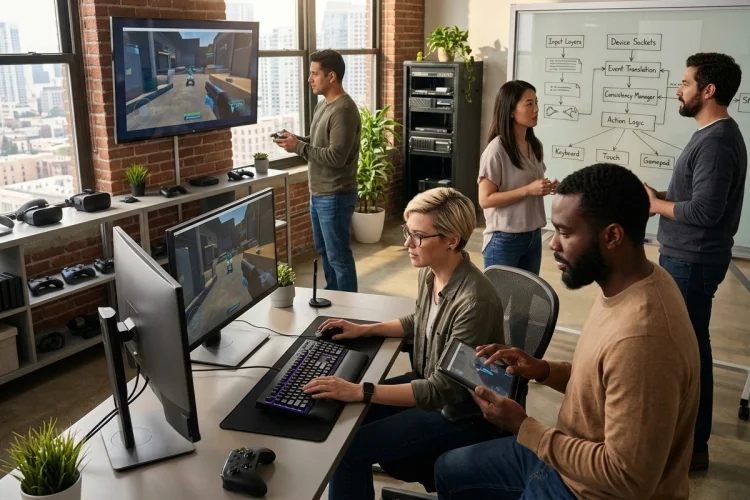
A modern entertainment platform may need to understand dozens of interaction methods without making users think about any of them.
Controllers connect and disconnect, touchscreens rotate, keyboards use different layouts, and several players may interact with the same system at once.
That is why Advanced Input Architecture has become much more than basic button handling.
A strong system manages device discovery, input ownership, remapping, latency, accessibility, and changing hardware conditions while keeping the application’s core logic surprisingly simple.
Start With Capabilities Instead of Device Names
One common development mistake is building rules around specific hardware.
For example:
“If Xbox controller, do this.”
“If PlayStation controller, do that.”
This might work initially, but device lists grow quickly. Third-party controllers, handheld devices, Bluetooth remotes, virtual controllers, racing wheels, and accessibility hardware soon complicate the logic.
A better approach is capability detection.
Ask what the device can do rather than what brand it is.
Does it provide analog movement?
Does it have directional navigation?
Does it support vibration?
Does it provide motion data?
Apple’s Game Controller framework follows a similar model through controller profiles and input elements such as buttons, axes, directional pads, touchpads, keyboard, and mouse input. It can also handle multiple connected controllers.
Capability-based design makes an architecture easier to extend as new hardware appears.
Create Stable Input Contracts
Once hardware has been detected, the rest of the platform should receive a stable contract.
Think of this contract as a language shared by every input source.
A touchscreen may produce a tap. A controller produces a button press. A keyboard produces a key event. Yet all three can become:
UI_SELECT
That logical command can remain identical across PC, mobile, smart TV, handheld, and console versions.
This model lets device adapters change without forcing gameplay or user-interface systems to change with them.
It also means developers can build device modules seperately. A new input adapter only needs to translate its hardware data into the platform’s existing action contract.
The architecture becomes modular rather than tightly coupled.
Handle Analog Inputs as Continuous Data
Buttons are relatively simple because they usually have clear on and off states. Analog controls are more complicated.
Thumbsticks, triggers, steering wheels, motion sensors, and touch gestures generate continuous values.
A thumbstick may technically report tiny movements even while appearing centered. Without filtering, a character or cursor could slowly drift.
An Advanced Input Architecture therefore needs dead zones, normalization, sensitivity curves, and potentially smoothing.
For instance, values between -0.08 and +0.08 might be treated as zero. Beyond that area, the remaining range can be remapped back toward -1.0 to +1.0.
Android’s controller model exposes analog sticks and triggers through motion axes, alongside button states represented through key events.
These details are why raw device values should rarely be passed directly into application behavior.
Manage Multiple Players and Input Ownership
Local multiplayer adds another challenge: who owns each controller?
If four controllers are connected, the platform needs a reliable relationship between device, player, profile, and current session.
A useful internal model is:
Physical Device → Input User → Player Slot → Action Context
When a new controller connects, it can remain unassigned until someone presses a join button. After that, input from the device is routed only to its assigned player.
Apple’s Game Controller framework exposes player indexing for connected controllers, while Android supports multiple gamepads for local multiplayer scenarios.
The system should also accomodate disconnects gracefully.
Instead of immediately destroying the player’s session, pause the relevant interaction and allow the same or another device to reconnect.
That sounds small, but it dramatically improves the real-world experience of wireless controllers.
Make Remapping a Core Feature
Control remapping should not be added after the architecture is finished. It should be part of the architecture itself.
If logical actions already exist independently from physical controls, remapping becomes straightforward.
A configuration might say:
Jump → Keyboard Space
or:
Jump → Gamepad South Button
SDL’s gamepad system demonstrates how mappings can convert device-specific joystick controls into standardized gamepad positions, including axes, buttons, and hat switches. It also supports adding mappings for devices that aren’t already recognized.
The same principle can be applied one layer higher for user configuration.
Store mappings seperately from gameplay logic, detect conflicts, and allow users to restore sensible defaults.
This is good usability, but it is also good engineering.
Accessibility Should Share the Same Input Pipeline
Accessibility becomes much easier when the input architecture doesn’t assume that every user interacts with the platform in the same way.
Alternative buttons, adaptive controllers, simplified control schemes, hold-versus-toggle behavior, remapped actions, keyboard navigation, and adjustable analog sensitivity can all sit on top of the same logical action model.
A user may activate an action using a standard controller while another uses an adaptive device. From the application’s perspective, the result is still:
ACTION_CONFIRM
This prevents accessibility support from becoming a seperate parallel system that developers struggle to maintain.
It also makes menus more usable. Microsoft recommends designing Windows experiences that remain usable with gamepad and remote-control input alongside mouse, keyboard, and touch, particularly for TV-style interaction.
Inclusive control design becomes part of the platform instead of an optional patch.
Protect Responsiveness With Smart Input Timing
Responsivness matters as much as functionality.
A platform can support hundreds of controllers, but users will notice immediately if pressing a button feels delayed.
The architecture should therefore minimize unnecessary transformations between physical input and the simulation or UI system.
For continuous gameplay, input is often sampled during or immediately before a simulation update. For UI interactions, queued events may be perfectly acceptable.
Gamepad APIs commonly support both styles. Apple’s framework allows developers to inspect current controller values during the game loop or receive callbacks when values change.
Microsoft GameInput similarly supports polling and callbacks while focusing heavily on low-latency input processing.
Different situations deserve different timing models.
The important thing is to measure them rather than assume they feel fast enough.
Test the Architecture, Not Just the Hardware
Device testing is necessary, but architecture testing is even more valuable.
Instead of requiring ten physical controllers for every automated test, developers can create virtual input sources that generate logical actions.
A test might simulate:
NavigateRight → NavigateRight → Confirm
The UI system shouldn’t care whether those commands originated from a controller, keyboard, touchscreen, or test harness.
Developers should still perform real-device testing for dead zones, wireless behavior, platform-specific quirks, hot-plugging, and haptic feedback. Hardware compatiblity problems can only be discovered so far through simulation.
But separating logical testing from hardware testing makes the entire process faster and more predictable.
Advanced multi-device control isn’t about supporting the largest possible list of hardware.
It is about creating stable layers between devices and application behavior. Build around capabilities, logical actions, player ownership, remapping, accessibility, and measurable latency.
With a solid Advanced Input Architecture, your entertainment platform can adapt to new interaction methods without constantly rebuilding its foundations.